
Free Granola alternatives: the 5 best options in 2026

Granola is genuinely good, and its free plan is genuinely free, but it only keeps 30 days of meeting history. Keeping more costs $14 per user per month. I make MeetMouse, so judge it with that in mind: it's free for 3 meetings a week, $20 once for unlimited. Each tool below says what it does better than us.
Download MeetMouse freeFree for 3 meetings a week. No bot, and your meeting stays on your Mac.
| Tool | Best for | Price for one person |
|---|---|---|
| 1. Fathom | free notes with no minute cap | Free; Premium $20/mo |
| 2. MeetMouse (mine) | no bot, free for 3 meetings a week; $20 once for unlimited | Free; $20 once for unlimited |
| 3. tl;dv | sharing clips with your team | Free; Pro $29/seat/mo |
| 4. Otter | searching months of old transcripts | Free 300 min, then $16.99/mo |
| 5. Fireflies | sales teams that need CRM sync | From $18/user/mo |
1. Fathom
The best free notetaker on the market. Recordings, transcripts and instant AI summaries with no minute cap. Advanced summaries, AI action items and Ask Fathom are on Premium at $20 a month. The trade is a bot in your calls by default (bot-free capture is in beta) and every meeting in their cloud. If neither bothers you, get Fathom.
Good
- Free individual plan with no minute cap
- Recordings, transcripts and AI summaries
- Team features from $19/user/month when you need them
Not so good
- A Fathom bot joins your calls by default; bot-free capture is still in beta
- Advanced summaries and action items need Premium ($20/month)
- Your meetings live in their cloud
2. MeetMousemine
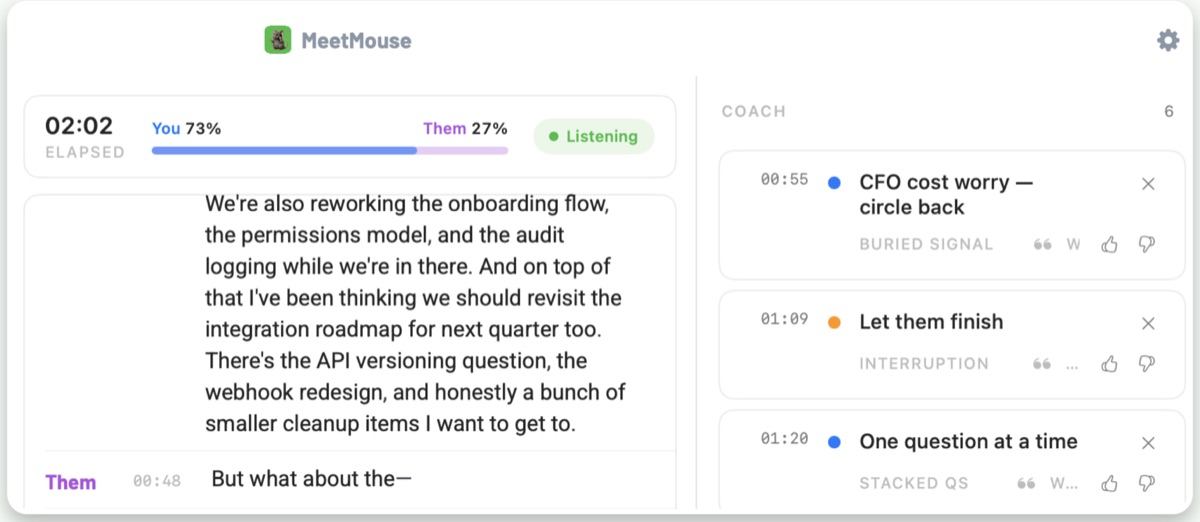
I built MeetMouse because years of transcripts never made me better at meetings. It listens on your Mac, shows a live transcript and talk balance, and nudges you during the call: land the ask, let them finish, pin down that vague "sounds good." Transcription and AI run on your Mac by default and it works with WiFi off. Pick it if privacy matters or you want to change the meeting, not file it away.
Good
- No bot, no account, works with WiFi off
- Coaching cues during the call, hidden from screen shares
- Free to start; unlimited is $20 once, cheaper than two months of most paid plans
Not so good
- Mac only (macOS 14.2 or later)
- No CRM sync or team dashboard
- If you turn on Claude or OpenAI in Settings, text goes to that provider (audio never does)
3. tl;dv
If what you share with your team is "watch these 40 seconds," tl;dv's clipping beats everyone's. The free plan records without limits, but AI notes stop after 10 meetings. Pro is $29 a seat a month, or $18 billed annually.
Good
- Best clip-sharing on the list
- Free plan records unlimited meetings
Not so good
- Free AI notes stop after 10 meetings
- A bot joins calls and recordings live in their cloud
4. Otter
Otter has been transcribing meetings the longest, and search across months of transcripts is excellent. It's the default for researchers and journalists. The free plan is about a week of real meetings. Pick it if the archive is the point.
Good
- Strong search across months of meetings
- The default for researchers and journalists
Not so good
- Free plan stops at 300 minutes a month and 30 minutes per conversation
- A bot joins calls by default (its desktop app can record without one)
- Audio is processed in their cloud
5. Fireflies
Fireflies is infrastructure for sales orgs: record every call, score it, push it to the CRM and let managers review talk time across the team. For one person it's a truck when you need a bicycle. Pick it if you run a sales team.
Good
- Pushes calls into your CRM
- Call scoring and manager dashboards
- Free plan transcribes unlimited meetings
Not so good
- Overkill for one person
- Free plan keeps only 400 minutes of storage per team
- A bot joins every call
- Priced per seat
What each costs
| Tool | Free plan | Paid | Bot joins? | Where audio goes |
|---|---|---|---|---|
| Fathom | Unlimited recordings, transcripts and instant summaries | Free for individuals. Premium $20/month. Team $19/user/month (2-seat minimum). | Yes by default (bot-free in beta) | Their cloud |
| MeetMouse | Unlimited first week, then 3 meetings a week; notes never locked | Free for 3 meetings a week. $20 once for unlimited. No subscription, no account. | No | Stays on your Mac |
| tl;dv | Unlimited recordings, AI notes on 10 meetings | Free with unlimited recordings and AI notes on 10 meetings. Pro $29/seat/month ($18 billed annually). | Yes | Their cloud |
| Otter | 300 minutes a month, 30 minutes per conversation, your 25 most recent | Free for 300 minutes a month. Pro $16.99/month. | Yes by default (desktop app can skip it) | Their cloud |
| Fireflies | Unlimited transcription, limited AI summaries, 400 minutes of storage per team | Free plan with limited AI summaries. Pro $18/seat/month ($10 billed annually). | Yes | Their cloud and your CRM |
| Granola | Unlimited meetings, 30 days of history | Free with 30 days of meeting history. Business $14/user/month. | No | Cloud AI for notes |
Prices for one person, monthly billing, read from each tool's pricing page on October 20, 2026. Check before you buy; these change.
When Granola is enough
If you only need your last 30 days of meetings, Granola's free plan might already be everything you need. It's bot-free and the notes are excellent. The history limit is the whole business model. Inside it? Stop shopping.
Checked, but not ranked
Voice memo + an AI chat. $0. Record with QuickTime or Voice Memos, drop the file into ChatGPT or Claude and ask for a summary with action items. No bot, no subscription, just a few manual steps.
Poised. It coaches live too, but it coaches delivery (filler words, pace, confidence) as a cloud subscription with an account. A good pick if public-speaking mechanics are the problem. MeetMouse vs Poised
How I checked
Every price and plan limit comes from the tool's own pricing page or help docs, read on October 20, 2026, for one person paying monthly. The ranking is for one person on Zoom, Meet or Teams who cares where their meetings go and wants to get better at them, not a sales team. Nobody paid to be on this list. I make MeetMouse, and its price is the one on this site.
How to switch
- Download MeetMouse free and open the DMG.
- Allow the microphone and Screen Recording, so it hears both sides without a bot.
- Start your next Zoom, Meet or Teams call. Want to try it first? The 15-second demo needs no permissions.
- Keep Granola running alongside if you still want its archive. They don't know about each other.
Questions
- What is the best free alternative to Granola?
- Fathom. Its free plan has unlimited recordings and summaries with no monthly cap. The catch is that a bot joins your calls by default and meetings are stored in Fathom's cloud.
- Is there a free Granola alternative without a bot?
- MeetMouse is free for 3 meetings a week with no bot, and its notes never expire (I make it). Granola's own free plan is bot-free too, with 30 days of meeting history. Recording with Voice Memos and pasting into an AI chat is also bot-free and costs nothing.
- Is there a Granola alternative without a subscription?
- MeetMouse: free for 3 meetings a week, or $20 once for unlimited, with no subscription and no account. It writes your notes on your Mac and coaches you live during the call.
- What are the limits of Granola's free plan?
- Granola's free Basic plan keeps 30 days of meeting history. Unlimited history needs Business at $14 per user per month.
Try MeetMouse
Free to start: unlimited your first week, then 3 meetings a week, and your notes are never locked. Invite 2 friends or pay $20 once for unlimited. No subscription, no account.
Download MeetMouse freeI checked prices and features for the tools here in October 2026. This stuff changes constantly, so double-check before you buy.
All trademarks belong to their owners. Named for comparison only.